Veilio Insight

Insight is the welfare side of Veilio, and it comes with it. Reviewers can see their own exposure figures, mark the days that were hard, and ask Occupational Health to get in touch. Occupational Health can see when someone has had a particularly heavy month, and follow up the requests that come in.

Why we built it

It can be hard to tell someone you're struggling, and most welfare checks depend on people doing exactly that.

Veilio already measures how much each reviewer has had to look at, as it happens. Insight shows those figures to the reviewer and to Occupational Health while they're still current, so a heavy month can be talked about at the time. It also gives reviewers a way to ask for help, and Occupational Health a way to make sure those requests are followed up.

Who sees what

A reviewer
Their own figures, the days they've marked as hard, and their own requests to talk.
Occupational Health
Each reviewer's figures by name, and every request to talk. Every time they open someone's figures, it's recorded.
A manager
Their team's month, with nobody named.
Security and audit
Whether Veilio is working on every machine, and whether its records arrived complete. They don't see the welfare figures.

It isn't for monitoring staff

If a manager can see one person's figures, sooner or later they become a performance measure. A reviewer who thinks their figures might be used against them stops using the tool honestly, and then it's no help to anyone. So nothing in Insight lets a manager see what one person did or when.

Managers don't see names, requests, notes or marked days. A figure is withheld where fewer than 10 people contributed to it, and a day when fewer than 10 people worked is left out of every figure and never dated. They only get whole calendar months, because two overlapping periods could be compared to work out one person's figures.

For the reviewer
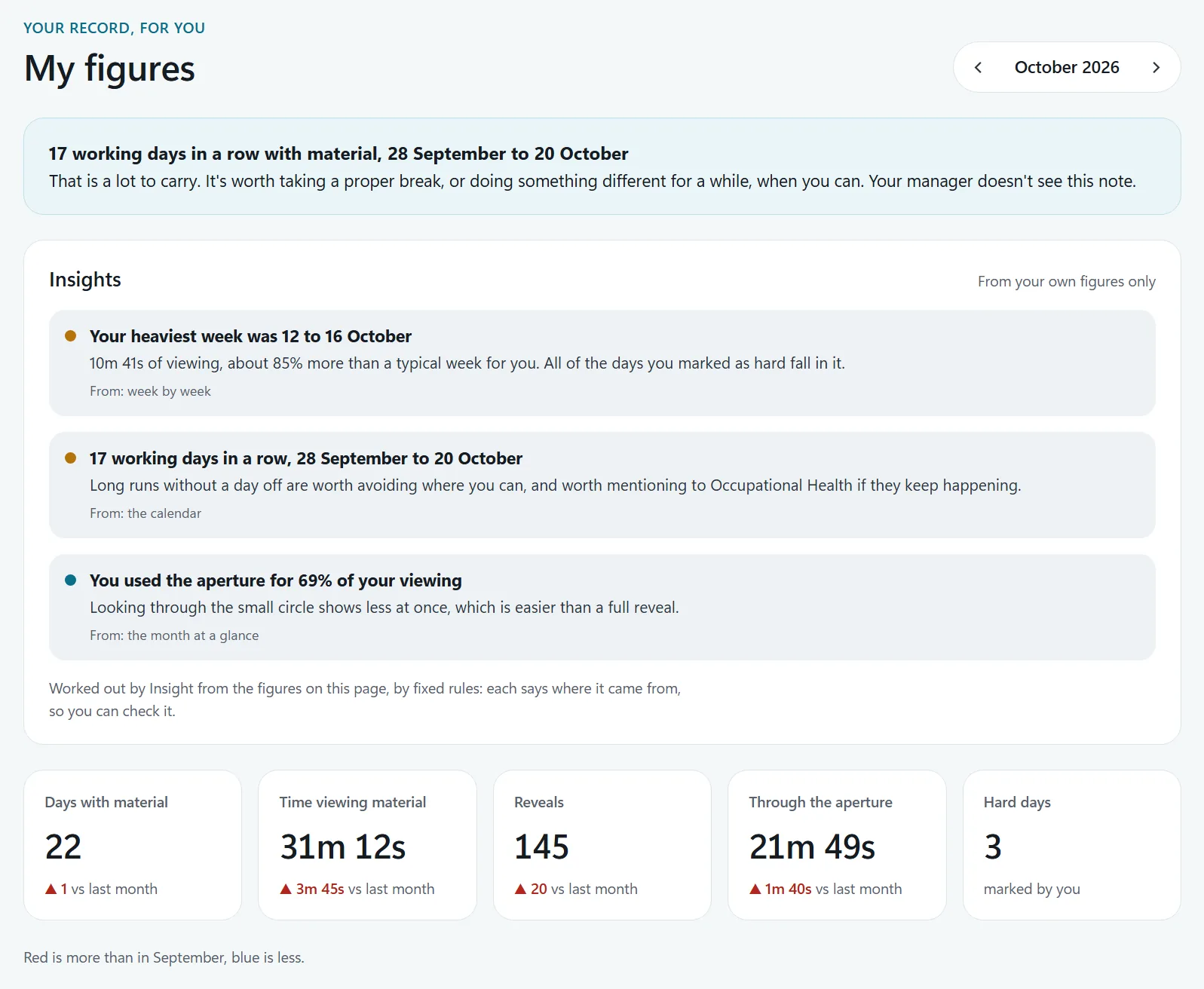
A reviewer's page for October. At the top a note: 17 working days in a row with material, with a suggestion to take a proper break. Below it three plain observations, then five figures with the change on September: 22 days with material, 31 minutes 12 seconds viewing, 145 reveals, 21 minutes 49 seconds through the aperture, and 3 hard days marked.
One reviewer's month, from made-up figures. Red is more than the month before, blue is less.
How this month compares
Days with material, time spent viewing, reveals and time through the aperture, each against the month before.
A nudge to take a break
After a long run of working days with material, a short note suggests taking a proper break. Their manager doesn't see it.
Things worth noticing
Insight points out a few things from the figures on the page, such as their heaviest week. Each one says which figures it came from, so it can be checked.
Hard days
Viewing time can't tell you how hard someone found something, so a reviewer can mark the days that were hard. Only they and Occupational Health see the marks.
Weekends and bank holidays
A bank holiday doesn't break a run of days, and isn't counted as a day off. Anything worked at a weekend or on a bank holiday is always counted, and shown separately.

Asking to talk

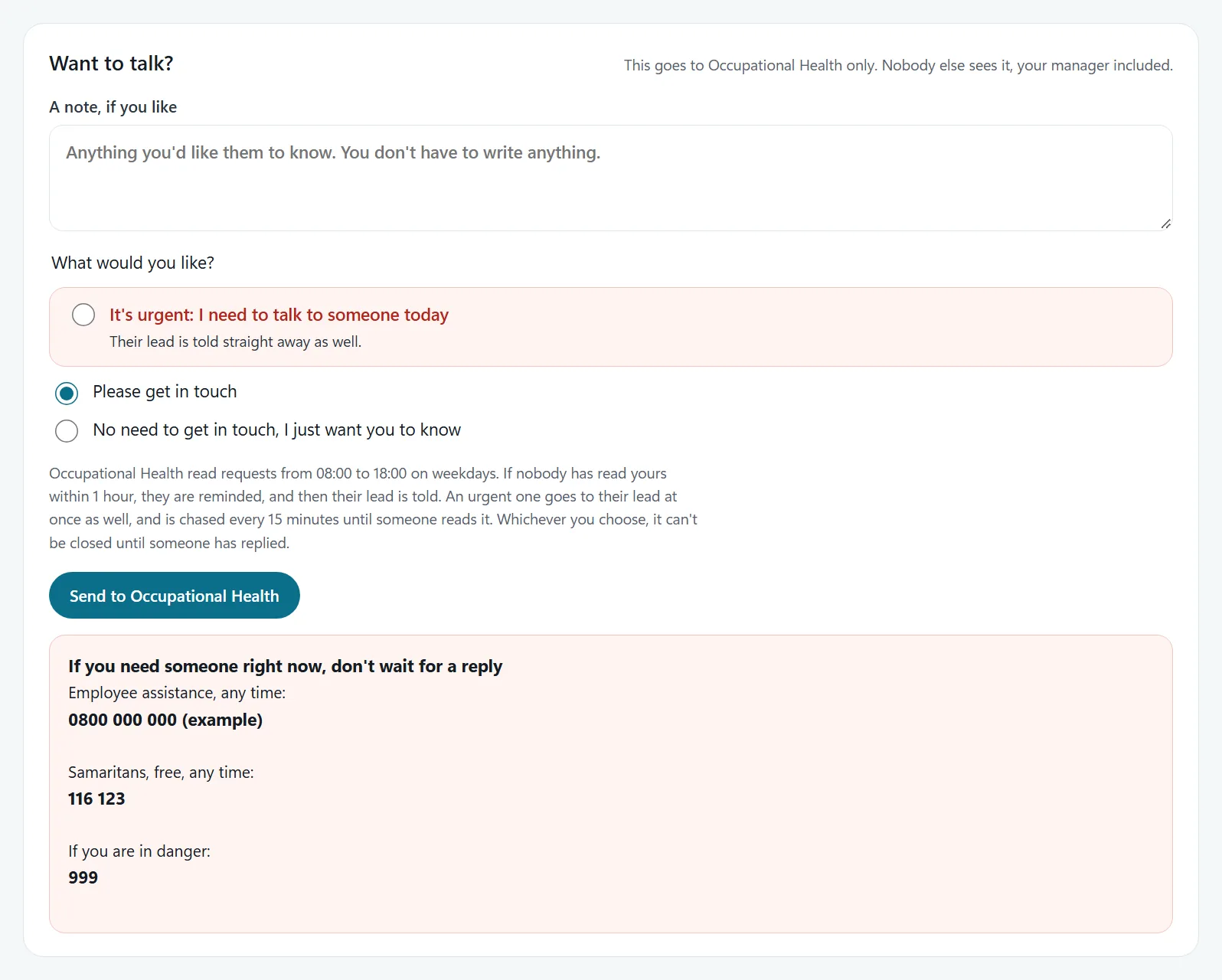
A form headed Want to talk, with a box for an optional note and a choice of three: it is urgent and they need to talk to someone today, picked out in red; please get in touch, chosen to start; or no need to get in touch. Below it a send button and the numbers to call straight away.
A note is optional. The numbers to call straight away are always on the page.
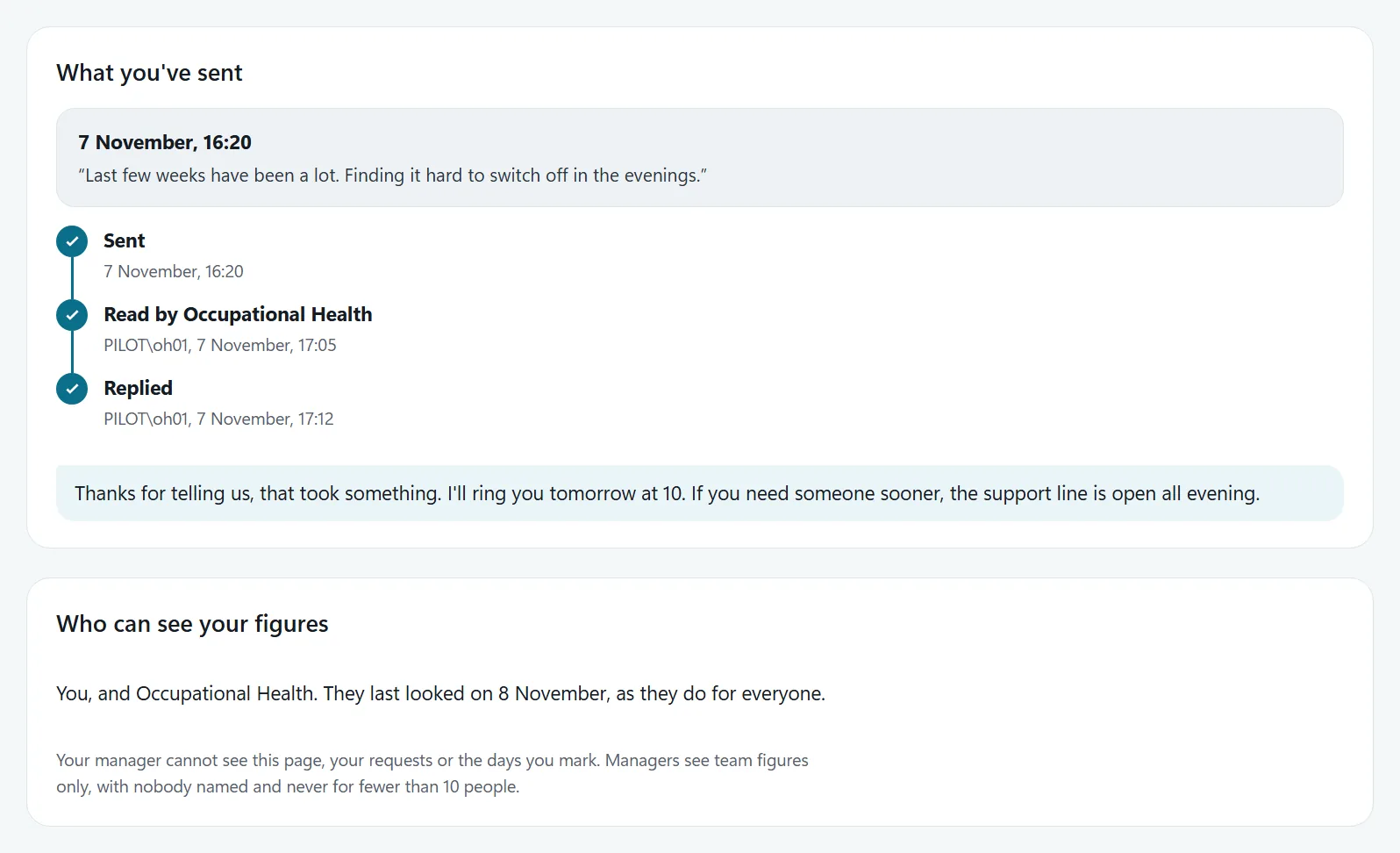
A request the reviewer sent, shown as three steps: sent at 16:20, read by a named member of Occupational Health at 17:05, and replied at 17:12, with the reply underneath.
Afterwards the reviewer can see when it was read, who by, and the reply.

How requests are followed up

Straight away
Every request goes to the Occupational Health mailbox the moment it's sent. An urgent one goes to their lead as well.
If nobody opens it
By default, the mailbox gets a reminder after an hour and the lead is told after four. An urgent request is sent to both again every 15 minutes until someone opens it.
If it's opened but not answered
The lead is told after a day, or after an hour if it's urgent.
If too many are waiting
When three or more are waiting unopened, the lead gets a warning every hour until the queue comes down.
Closing a request
It can only be closed once somebody has replied to it.
What the emails say
Only that a request is waiting and where to open it. Never who sent it or what they wrote. Mailboxes get forwarded and kept for years, so the note stays in Insight, where only Occupational Health can read it.
Checking the emails arrive
Before Insight relies on an email address, someone at that address has to confirm the emails are reaching them. Until they do, Insight warns that they might not be.

Insight can make sure a request gets seen. It can't promise someone will be free in the next five minutes, which is why the numbers to call straight away are always on the page.

For Occupational Health
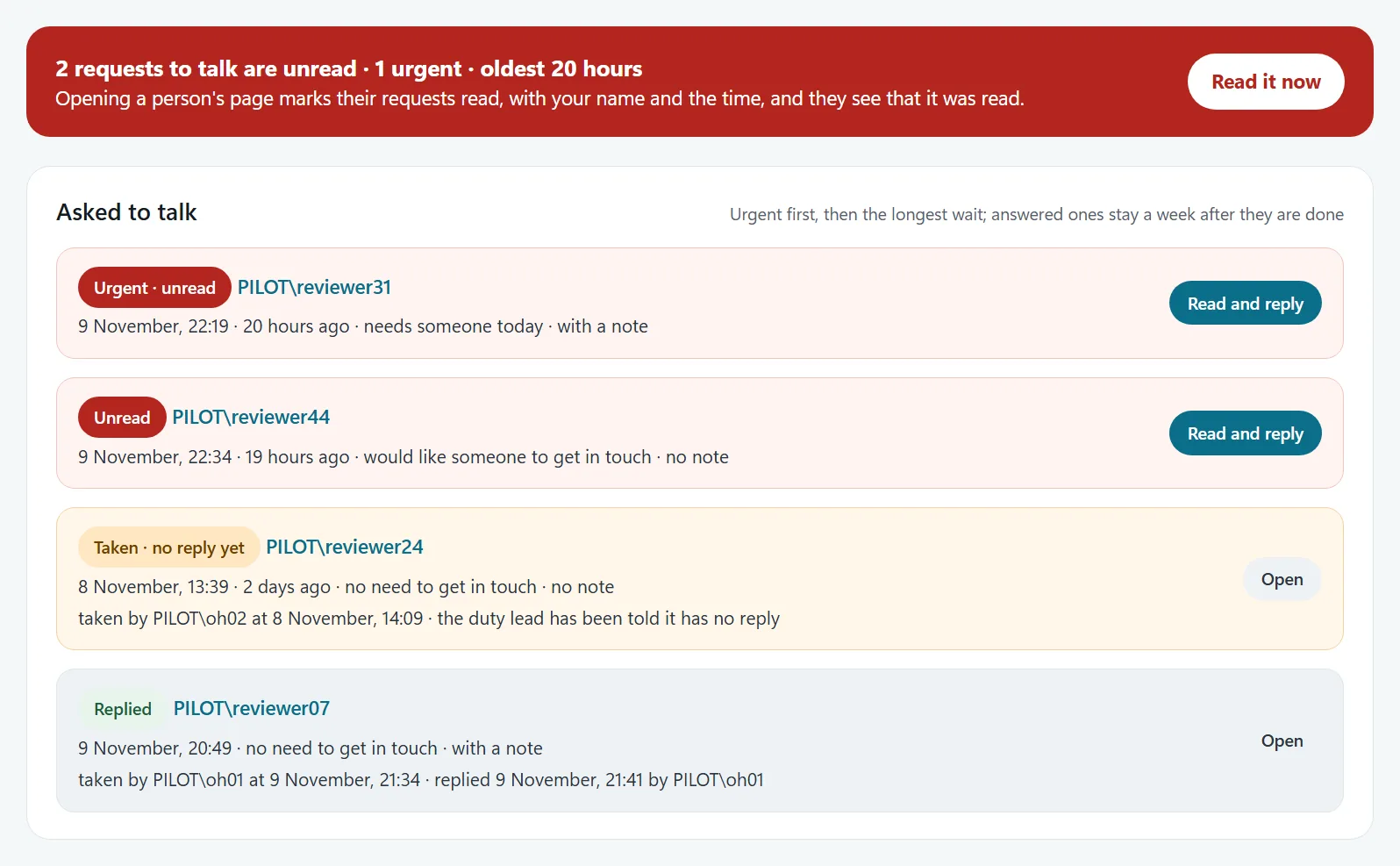
Occupational Health's requests: a red banner saying two requests to talk are unread, one urgent, the oldest 20 hours, then the requests in order, urgent first, each with when it was sent and where it stands.
Requests come first, urgent ones at the top. From made-up people.

Occupational Health see each reviewer's figures by name, the days they've marked and every request they've made. A request is marked as read when someone in Occupational Health opens that reviewer's page, where the note is shown in full. The reviewer can see who opened it and when.

For managers
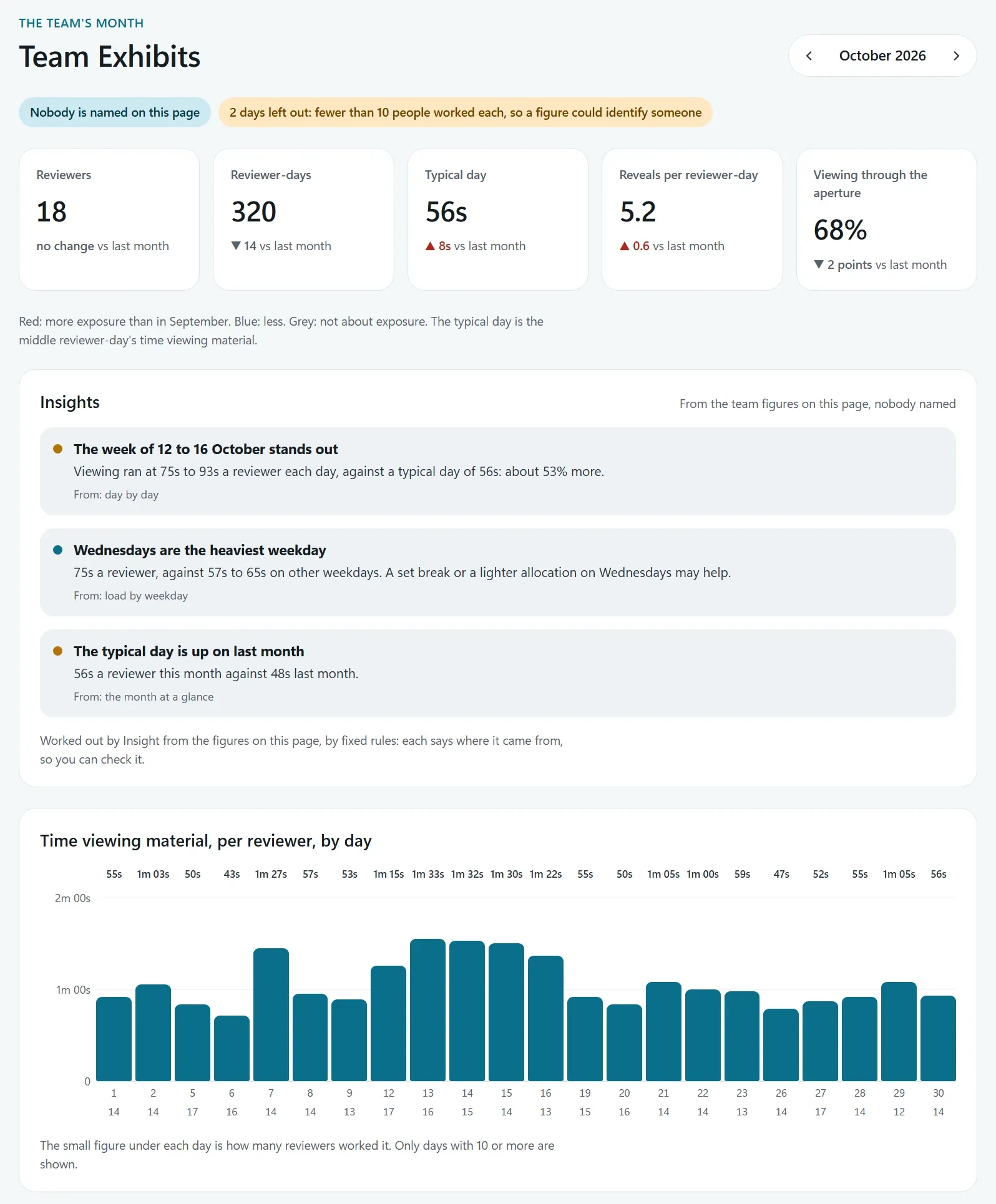
A team's month with nobody named: 18 reviewers, 320 reviewer-days, a typical day of 56 seconds viewing, 5.2 reveals per reviewer-day, 68% of viewing through the aperture, three observations, and a bar chart of viewing per reviewer each day.
A team's month, from made-up figures. Two days are left out because fewer than 10 people worked them.

Managers see a monthly overview of their team to help plan workloads, rotas and breaks, such as which weeks and weekdays were heaviest. Nobody is named, and figures are withheld where fewer than 10 people contributed.

For security

Veilio's audit record gets to Insight within seconds of being written, so if anyone changes it on the PC afterwards, it shows. Each record is checked against the one before it as it arrives, so a missing or altered one stands out, and a session that stopped sending before it closed gets flagged.

The security page shows whether Veilio is working on every machine. It doesn't show any of the welfare figures.

Where it runs

Server
A Linux server of your own, in your network or your own cloud account.
Signing in
People use their normal work account, through Entra ID or Active Directory. What each person can see comes from groups in your own directory.
Encryption
The pages use HTTPS with your own certificate, and Veilio's PCs send their records over an encrypted connection.
Email
Through your own Exchange or Microsoft 365, encrypted.
What we get
Nothing. StackNine never sees any of it.

Set up with your own people

Your Occupational Health team and psychologists know your people far better than we do, so Insight is set up with them. They decide when the break note appears, how fast requests are chased, who gets told and which numbers to call.

It'll keep changing as they use it and tell us what's missing.

More